Cancellations/No Show Report
The Cancellations/No Show report allows users to view a list of canceled reservations based on arrival date or cancellation date.
Perform the following steps to generate the report:
Navigate to Reports ➜ Dynamic Reports ➜ Manager ➜ Cancellations/No Show report.
Refer to the following table and fill in the fields.
|
Field |
Description |
|---|---|
|
Report Name |
AR Discrepant Reservations and Groups. |
|
Property |
This is a mandatory multi-select drop-down list that allows users to the select the properties to be included in the report. The current property is selected by default. |
|
Start Date |
This is a mandatory field that allows users to select a start date for report generation. By default, the current property date is selected. Users can select any date in the past or future. |
|
End Date |
This is a mandatory field that allows users to select an end date for report generation. By default, the current property date is selected. Users can select any date in the past or future. |
|
Status |
This is a mandatory multi-select drop-down list that allows users to select from the following statuses of reservations to be included in the report:
|
|
Show overridden reservations only |
When selected, only the reservations that were cancelled by overriding the associated cancellation policy will be displayed. |
|
View By |
This is a mandatory single-select drop-down list that displays the following options:
|
Click Run to generate the report.
Click Save to save the report under User Favorites section.
Sample Report
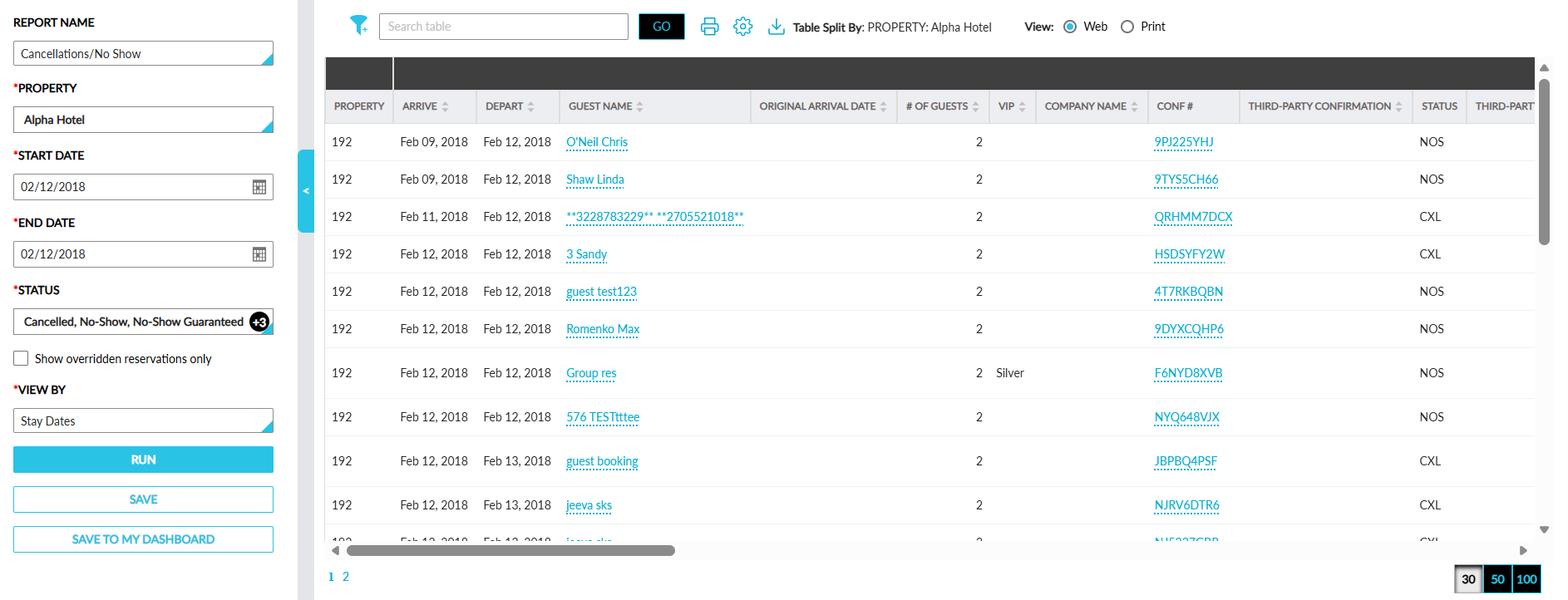
Report Fields
This report displays the following fields:
|
Field |
Description |
|---|---|
|
Property |
The property ID of the property. |
|
Arrive |
The latest arrival date of the reservation. |
|
Depart |
The departure date of the reservation. |
|
Guest Name |
The guest name associated with the reservation. |
|
Original Arrival Date |
The original arrival date of the reservation. |
|
# of Guests |
The count of guests associated with the reservation. |
|
VIP |
The VIP status of the guest. |
|
Company Name |
The company name associated with the reservation. |
|
Conf # |
The confirmation ID of the reservation. |
|
Third-Party Confirmation |
The third-party confirmation ID of the reservation. |
|
Status |
The status of the reservation. |
|
Third-Party Cancellation |
The third-party cancellation ID if applicable. |
|
Cancel Date |
The date when the reservation was cancelled. |
|
Update Time |
The time when the reservation was last updated. |
|
Cancelled By |
The username of the user who cancelled the reservation. |
|
Reason |
The reason for the cancellation. |
|
Comments |
The comments entered when cancelling the reservation. |
|
Policy |
The cancellation policy associated with the reservation. |
|
Policy Overridden By |
The user who performed the override of the cancellation policy when the reservation was cancelled. |
|
Room |
The room type code of the reservation. |
|
Player ID |
The patron ID of the patron associated with the reservations. This column is left blank when no patron ID is available for a reservation. |
|
Group |
The group name associated with the reservation. |
|
Booked Date |
The date when the reservation was booked. |
|
Booked By |
The user who booked the reservation. |
|
Cancellation Amount Due |
The cancellation amount due for the reservation. |
|
Cancellation Amount Charged |
The cancellation amount charged for the reservation. |
|
Rate Plan |
The rate plan code associated with the reservation. |
|
Base Rate |
The base rate of the reservation. |
|
Deposit Policy |
The deposit policy associated with the reservation. |
|
Deposit Amount Collected |
The deposit amount collected for the reservation. |
|
Account Balance |
The folio balance of the reservation. |
|
Override Date and Time |
The date and time when the cancellation policy was overridden. |
|
Cancellation Policy Override Reason |
The reason for the cancellation policy override. |
|
Original Cancellation Policy |
The cancellation policy associated with the reservation at the time of booking. |
|
Original Cancellation Amount |
The cancellation amount charged based on the original policy that was associated with the reservation. |
|
Difference |
The difference in the cancellation fee between the old and new cancellation policies associated with the reservation. |